Game keys and DLC keys
Every server is its own copy of the game. It needs its own game key, and its own key for every DLC it uses.
On this page
Buy through the links on this page and the partner code FSGAME comes along automatically. It supports this project and many others. Shopping on the GIANTS store some other way? Use the code FSGAME there.
The game#
Each server's profile is activated once with a game key, the same way a PC is when you play. GIANTS' own server documentation says it plainly: a separate license is needed for each dedicated server, and you can't play as a client with a key a server is using.
- Farming Simulator 25 (PC digital download) one per server, plus one for you
Buy the PC download from GIANTS. It comes with a product key, and the product key is what a server profile asks for.
How many do I need?#
| You run | Game keys |
|---|---|
| 1 server, and you play on another PC | 2 |
| 3 servers, and you play | 4 |
| 8 servers for a community, nobody plays on the server PC | 8 (players bring their own) |
Season passes: the better deal#
If your servers will run a few DLCs, get a season pass for each server instead of the DLCs one by one. A pass covers a whole year of DLCs for less than buying them separately.
A season pass doesn't install anything by itself. You get one key for the pass. With it, download each DLC in the pass on its own from the GIANTS download page, then install each DLC on each server (below).
- Farming Simulator 25: Year 1 Season Pass season pass
- Farming Simulator 25: Year 2 Season Pass season pass
Check each pass's page for the DLCs it includes.
DLCs one by one#
- MacDon Pack
- New Holland CR11 Gold Edition
- Farming Simulator 16bit Edition
- NEXAT Pack
- Plains and Prairies
- Highlands Fishing
- Mercedes-Benz Trucks
- JCB - WFT
- Vredo Pack
- SKY Agriculture Pack
- Beans & Alpacas
Installing a DLC on a server#
DLCs are per server. Each server's profile gets the DLC installed and its key entered once.
- Activate the server's profile first (the game key, with Activate on its card).
- Get the DLC's installer: on the GIANTS download page, enter the DLC or season pass key. The file is named like
FarmingSimulator25_extraContent…_ESD.exe. - In the manager, click DLC (top bar, or on the server's card), then Install DLC… next to the server.
- Pick the installer. It opens for that server's profile. Enter the key when it asks and let it finish.
- The DLC shows up in the list when it's in place. Restart the server so it loads it.
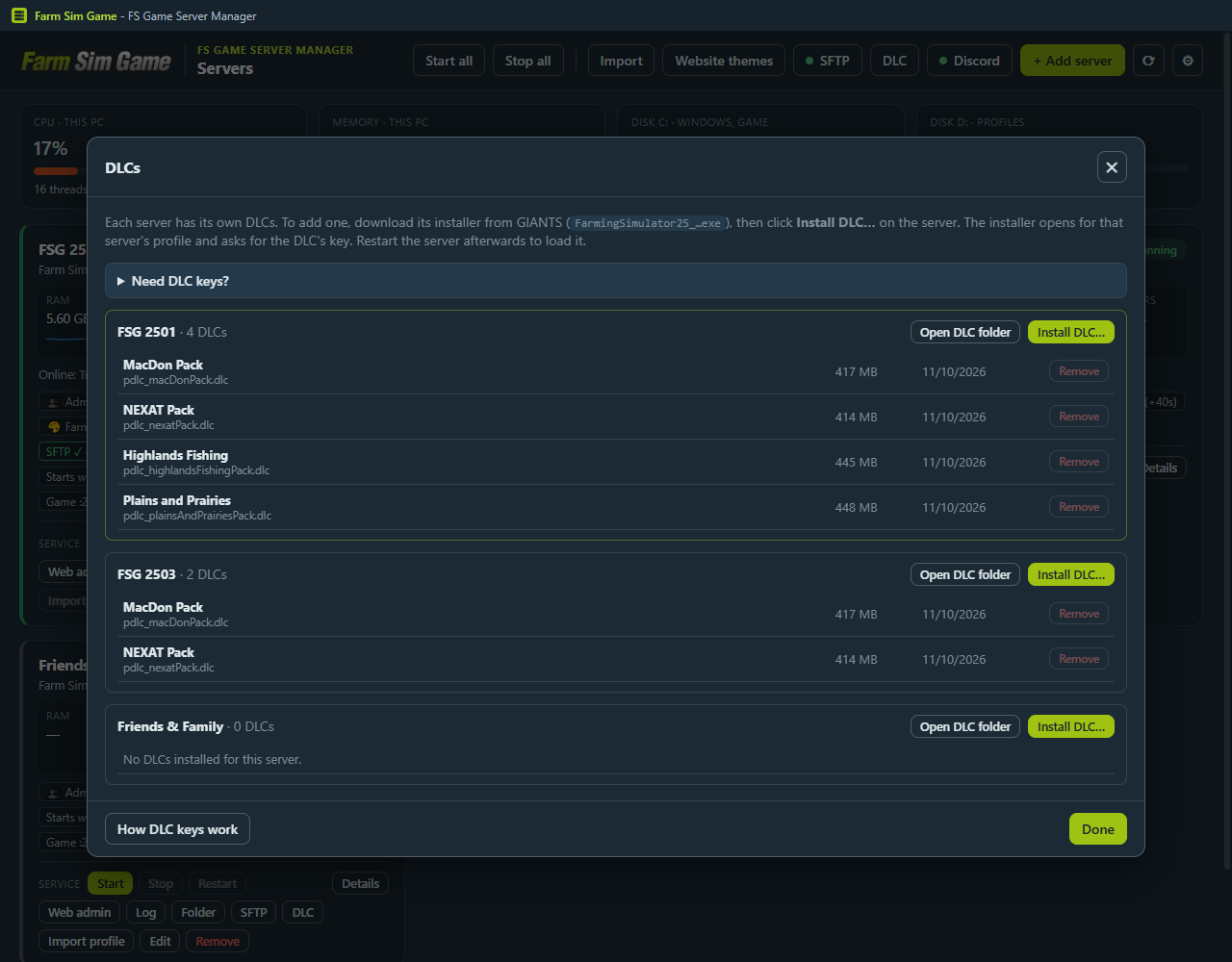
Repeat for each server, with that server's key. Removing a DLC (server stopped) moves its file to the Recycle Bin.
A server set up under its own Windows user, instead of the shared account, can't do this from the manager. Sign in to Windows as that user once and run the DLC installer there.
Do players need the DLC?#
Yes. Anyone joining a savegame that uses DLC content needs that DLC in their own game. A season pass is the easy answer for a community too.